


Update 14/03/2026
Due to changes by Google and a decision to make life more difficult for users, they have decided to shut down the excellent Gmailify service and the ability to fetch emails from other mailboxes using POP. Consequently, the team behind Gomailify has had to rebuild their entire service to meet these new requirements. They are now using the Google API to push emails to our inboxes. While it was a bumpy road at the start, the service now works brilliantly. I still highly recommend it and use it daily.
Update 01/07/2025
Because Gmailify.com was just too spicy for the trademark police, the owner of the service been forced to rename it to Gomailify. Apart of the nothing change, Same trusted service, same mission to supercharge your Gmail, just with a dash more go!
After years of using a free Google Workspace account, and after ups and downs with it, due to Google’s decision to kill it and then keep it alive, I decided to move my emails and other files back to my personal Gmail account.
My main reason for using Google Workspace was the ability to use my domain across Google services, mainly concentrating on the ability to send and receive emails within my domain, but still using the Gmail interface.
After extensive work I had done to move my data from Google Workspace back to my Gmail account, I set up an option for me to receive and send emails within my domain.

Adding a physical camera button to the iPhone 16 series was a great step towards people using it as a main device for photography and making videos, and believe it or not, there are a lot of them. Some people have even successfully made full movies with iPhones.
When I upgraded my 13 Pro Max to the 16 Pro Max, the camera button was something I had been looking forward to until I noticed that I was not using it at all!
A router with custom firmware (OpenWrt) is a basic device on my home network, but I am also using it in the business environment as a main device, and all works great.
In the past I used DD-WRT on my routers. Despite that their project is still ongoing, I found it lacking behind current needs.
OpenWrt use strictly depends on the device – router, that I am using. I always choose a device that will work for me and it will not bend under spikes of load.

GitHub is a great place to find some good resources and solutions. Whenever I need it personally or professionally, if the solution is really useful, I make sure to add a star to it.
I review my stars from time to time, and it wasn’t any different on the 31st of December 2024.
By the end of 2024, I had accumulated the following, which are really worth looking at.
The list is curated, and I pick the ones that are worth knowing for the following year, 2025.

The announcement of RCS support on iPhone with iOS 18 was a very big disappointment for me, as I mentioned in my earlier post; however, in recent days, the situation has changed.

Cloudflare’s DNS service, known as 1.1.1.1, has transformed the internet for the better and continues to make a significant impact every day.
From setting DNS on your device to installing the dedicated app for using WARP technology, you can make your connections faster by choosing optimised routes for traffic.
If you are an advanced user, you can secure your entire network at home or in the workplace by implementing Cloudflare technology at your router.
For some users, this may feel too overwhelming.
Windows 11 introduced built-in integration for Secured DNS (Encrypted) that can be implemented at the interface level (your network card, whether wired or wireless). Thanks to this, all the DNS requests going through it will be encrypted.

When Jack Dorsey departed from Twitter, it was passed into the greasy hands of another billionaire who turned it into a cesspool.
I don’t have anything against billionaires. Let them have their money; just do good with it, not harm. This reminds me of the meme that rings true for every hard-working person:
“Most people don’t want to be rich. They just want enough money to not worry anymore.”

I have been waiting patiently for the release of a new version of iOS mainly because of one feature – RCS.
RCS stands for Rich Communication Services. It is an upgrade to traditional SMS messaging, designed to enhance the messaging experience with features like read receipts, typing indicators, high-resolution images, group chats, and sharing larger files. RCS aims to provide an experience similar to messaging apps like WhatsApp or iMessage but integrated into the default SMS app on smartphones.
The main reason I have been looking forward to RCS was the ability to send messages to Android users, other than SMS, but still from the default Messages app.
RCS brings reactions, the ability to send pictures (replacing the outdated MMS service), and shows read receipts. Everything is standard when communicating between iPhone users using the iMessage service.
With the high popularity of WhatsApp, which filled the void and struggle when communicating between Android and iPhone users, RCS was meant to regain the market for native messaging apps.

Recently, I have been required to find a method of manually rebooting user phones on the company network. From time to time, once they are up and running, we discover that some features are causing problems. Sometimes we cannot transfer calls, or we do not hear the person we are talking with. The causes may be numerous, but most of the time, a simple reboot of the phone solves the issues.
The problem with rebooting user phones is that the computers they are using are connected to the internet using LAN cables (for stability). The network cable is connected directly to the phone socket and then goes from the phone to the user’s computer. This saves the need for using two LAN cables; however, once the phone is restarted, the built-in switch is also restarted, hence the network connection is interrupted.
We have some apps that, when they lose network connections, will lock users and require additional action to unlock them. Hence, it is not ideal to restart the phones throughout the day.
As I checked the phones and settings, I struggled to find a simple scheduler to perform the task of restarting phones overnight, so I needed to find a different way.
The phone I am using daily is an iPhone 13 Pro Max, which has been with me for almost 3 years. At the same time, when I got mine, I also got an iPhone 13 for my wife.
Straight after purchase, I opted for AppleCare+ with the monthly payment option. Thanks to the recurring payments, my device is still covered under AppleCare+.
I am considering an upgrade later this year, possibly in September 2024, but I am not rushing into it. My phone is performing well for its age and is still in pristine condition, which is important for potential resale value. The only thing that is showing signs of age is the battery.
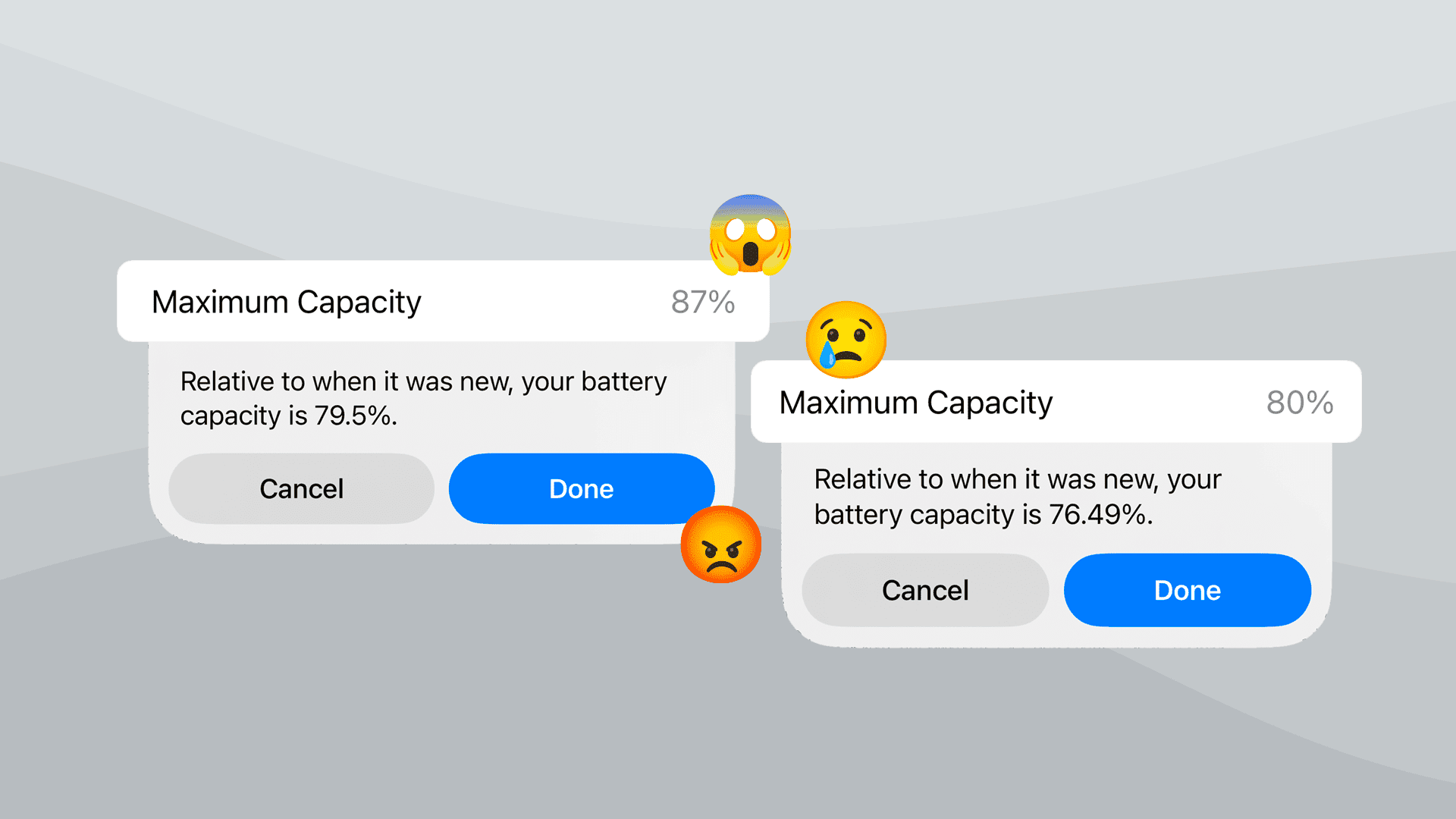
After over 33 months of daily use, I started noticing that the battery is not as good as it used to be. With the built-in Battery Health feature, I can see that it’s at 87% of design capacity. It’s not bad for its age.
However, after the same period with her iPhone 13, my wife began to notice that her phone needed to be plugged in much more often.
Recently, we even noticed that the battery surprisingly jumped from 59% to 61%, only to return to 59% shortly after.
This made me start thinking, so I quickly checked her battery health. From Settings > Battery > Battery Health & Charging, we can see that her health is at 80%.
It’s not a bad result after over 33 months, but also not great from the customer’s point of view, especially when you got AppleCare+ purchased.
According to AppleCare+ terms regarding the battery, you are entitled to have your battery replaced free of charge when it falls below 80%.
Exactly, it states “below” 80%, which currently you may think is not met, as the battery health in settings shows exactly 80%.
But what if that value is inaccurate?
My site use cookies 🍪. Read more about it on: Cookies Policy.