

Have you experienced this with AI? You ask a simple question, expecting a concise bullet-point answer or a short step-by-step guide, only to receive a full-blown essay in return. That is AI trying to “spit” tons of words to please us and demonstrate how thorough its responses can be. Most of the time, however, we simply do not need that.
Over time, consistently using a single dedicated AI tool with memory and personalisation enabled will teach the AI how to respond to you. Yet, new topics still frequently turn into an unnecessary wall of text.
After reading just a paragraph or two, your brain already has follow-up questions, and you do not really have time to read all the way to the end.
Sometimes you do not require AI to resolve your query with a ready-made solution immediately. Instead, as part of the learning process, you want to ask questions and analyse answers to gradually reach a point where you have learned something with the AI – rather than having the AI do the work for you.
People with differently wired brains, as well as highly intelligent individuals, do not use AI to replace their work. They need help processing significant amounts of information in a way that allows their brain to keep things organised, structured, and easy to comprehend.

I have been using the Bartender app for longer than I can honestly remember. The main issue with macOS for heavy users has always been the menu bar – the one in the top right corner of your screen.
The more apps you add, the more cluttered it becomes. If you have a Mac with a notch, it becomes even more annoying, as some icons are not displayed at all.
Bartender sorted the issue for me for quite some time.
After years of managing different versions and the hurdles that the creators faced due to constantly changing permissions in macOS, they settled on using screen recording to let the app work as it should.
Bartender allows you to hide icons that do not need to be displayed prominently all the time. Similar to how it used to be in the Windows operating system, macOS is still lacking that native feature.
In Bartender, you can opt to show hidden icons to the left, or as a separate shelf (a drawer or bar) under the menu bar. I opted for the second option, as it worked much better for me.
Apart from hiding icons, Bartender incorporates a very handy feature that allows you to change the spacing between icons. By default, the spacing is very wide. With lots of icons, you quickly find yourself looking for a solution, and most of the time you head straight for Bartender.
I paid for Bartender, and then for consecutive updates for years whenever a new macOS was released to maintain compatibility with the newest operating system – but not this time.
We are already waiting for macOS 27 Golden Gate, so yet again I was expecting an email from Bartender stating that I would need to pay and upgrade to keep everything running swiftly on the latest OS.
This happened exactly as expected when an email landed in my inbox titled Bartender Pro is Here.
The best part of the EU Digital Markets Act (DMA) is how it affects Windows 11 and the software installed on it. Thanks to the DMA, EU (EEA) users can easily remove Microsoft Edge and replace it fully – not just by hiding it – with Google Chrome or another browser if they want to.
When you’re living in the EU, you probably do not know how good that small enforcement is. In the UK, which is outside the EEA, Microsoft disabled that feature (thanks to all the Norberts who voted for Brexit).
Since the mechanism Windows uses to check this is entirely local, you can force the OS to behave like it is in an EU region.
The llms.txt and discussion around it recently is quite controversial.
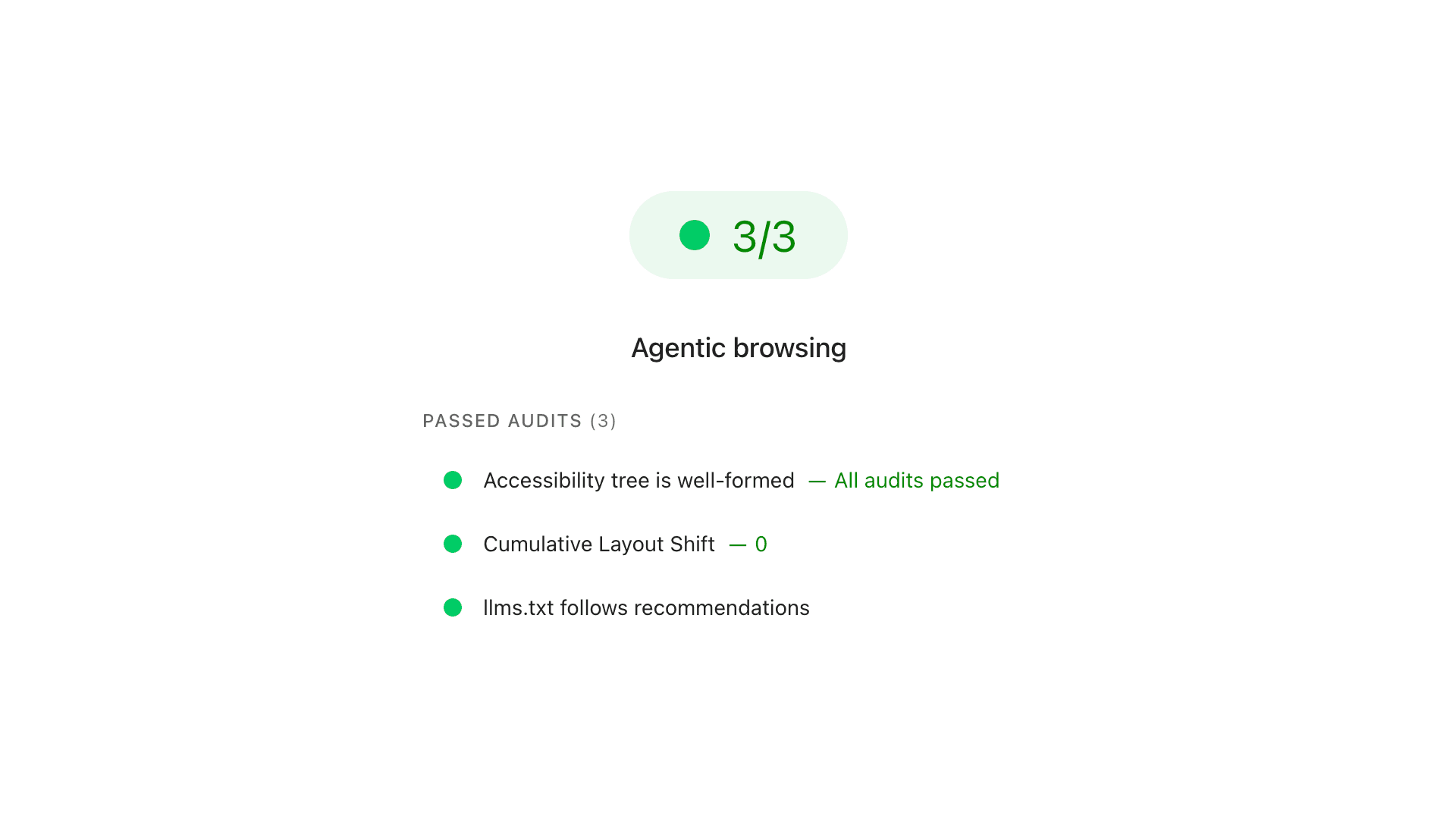
On one hand, Google’s Search Relations team (led by John Mueller and Gary Illyes) has explicitly stated that llms.txt files will not help your SEO or search rankings. On the other hand, Google’s developer tools team recently introduced an experimental “Agentic Browsing” category into Lighthouse and PageSpeed Insights that actively audits for an llms.txt file.
This seems contradictory, but it makes perfect sense once you separate Search Discovery from On-Page Navigation.

As an iPhone user, it is quite natural to choose Apple-branded devices to fulfil everyday needs. My first Apple Watch was a Series 4, followed by a Series 6. After a few years, I finally moved to the Series 10. This time, for myself at least, I am not looking for any further upgrade come September 2026, to whichever series arrives next.
Twenty years ago, I remember buying ringtones for my mobile phone; whereas now, my current phone is silent most of the time, with certain exceptions for important calls.
I have been a happy user of the Apple Watch for years. I do not have anything against it, apart from one thing. The device itself has become superior due to its medically graded sensors. We always hear stories of how the Apple Watch saved someone’s life by early detection of conditions that could lead to life-threatening situations.
Now that I am in my mid-forties, I look at that aspect much closer. For me, health features have become a major selling point. However, other aspects have slowly started to become annoying.
All measurements are done in the background and nicely synchronised with my device. The communication features, however, have become more of a nuisance, especially during stressful days at work. The constant buzzing has become a distraction rather than a useful feature.
Over recent months, I tried to break ties with my watch-screen addiction. It came to the point where I really wanted something that felt less like a phone on my wrist and more like an ordinary watch–but without losing those vital measuring capabilities.
So, I looked for an alternative.

The AI interaction is becoming more and more common. We are getting a lot of useful information (a lot of crap as well) very quickly through it, saving us time and making us more productive.
I will not be discussing here aspect we all fear now, that AI will be replacing us at work. Thats a total different subject. I will be thinking here from perspective of using the AI, Gemini in this case, to make myself more productive - by embracing it.
As it happened, Attended Sysupgrade with the latest version of OpenWrt 25.12, since it became the default approach to update OpenWrt devices, started seeing a spike in popularity.
When I first tried this, I was either 1st in the queue or just a few users behind. Days later, when the next version (25.12.1) was released, this jumped to around 200-300. Now, with another release (25.12.2), the servers cannot handle it anymore.
Server response: server overload, queue contains too many build requests: 1001
Following a discussion with one of my visitors, it was suggested that I use someone else’s server for Attended Sysupgrade, but there is always a catch to that. The recommended server uses SNAPSHOT builds as default, which I do not recommend for a production or business environment. While you can play with it on a home router, in business, you need to rely on stability.
I have been thinking that maybe I will create my own server for that purpose. I already have a small mini-PC at home (and at work) – a Chromebox repurposed as an Ubuntu Server running Docker. My usage is not massive, and there is plenty of computing power available.
I should have discovered this years ago!
I never came across this feature, and it was apparently available a few versions ago. Just now, when version 25.12.0 was officially released, I learned how to simplify upgrading from one version to another (I did this from 24.10.2 to 25.12.0).
I have developed my own routine for backing up packages and configuration files, installing a new image, and restoring everything. To be honest, I always hate doing that, especially in a business environment, as it always requires some downtime. This is why I sometimes fall behind on some sub-versions of OpenWrt firmware (I was still on 24.10.2 instead of 24.10.5).
When you cannot afford extended downtime, you can minimise it with this approach: Attended Sysupgrade (ASU).

We are living in times when AI is becoming a daily tool we use at work and at school.
A lot of students support themselves by using AI to learn new things, quickly find information, and extend their knowledge.
I am from a generation who finish schools and University before AI existed. During my Uni times, it was the Internet boom, and access to information started pushing out the need to visit a library to gain knowledge. Yet, despite all of that, I am proud that all my hard work put towards my education was my own.
In current times, a lot of students want to go the easy route. Same as with the workplace, where it’s hard to find a hard-working employee on very demanding job role for an average salary.
People no longer want to work hard to earn money. Everybody is looking into the easiest route earing tones of money by doing the minimum. It’s not working like that, at least not for the majority of us. If you are the person who thinks that’s how it’s working, if you are not a millionaire right now, then you are delusional.
Same with education. Knowledge that you gain is for you to be a better person in future. You’re learning stuff to use in your future life. If you decide to go the easy route and ask AI to write you a work that you will just copy and paste, then submit to a tutor, there is something significantly wrong here.
You can do this; nobody is stopping you (almost) from doing that, but how much are you learning from that?
For some time, I have been covering topics concerning OpenWrt on my website. One of the primary interests among my users has been the implementation of WireGuard and adding a Cloudflare WARP tunnel, as well as managing multiple internet connections on a single router.
What I have not yet covered is how to conditionally route traffic once we have established two internet connections, or when we have added a virtual connection (such as a VPN) to the router on a single physical connection.
While firewall rules can be used to route traffic, they are not always straightforward to implement; consequently, I looked for an alternative solution.
I was particularly interested in being able to quickly configure a router to direct traffic from a specific device over a VPN tunnel whenever necessary. To assist with this, I looked into the PBR (Policy-Based Routing) package.